Pages

Tuesday, 9 January 2018

SuperNova Emoji Library is now available in Kotlin for Android


Download Kotlin Source from Github: Download

Platform: Android 4.1 +

Language: Kotlin

Package AAR: Download

Maven:


Build Via Gradle: implementation 'com.dbh4ck:supernova-emoji-kotlin:1.0'

Origin: supernova emoji for android

Monday, 8 January 2018

Thursday, 21 December 2017

Thursday, 7 December 2017

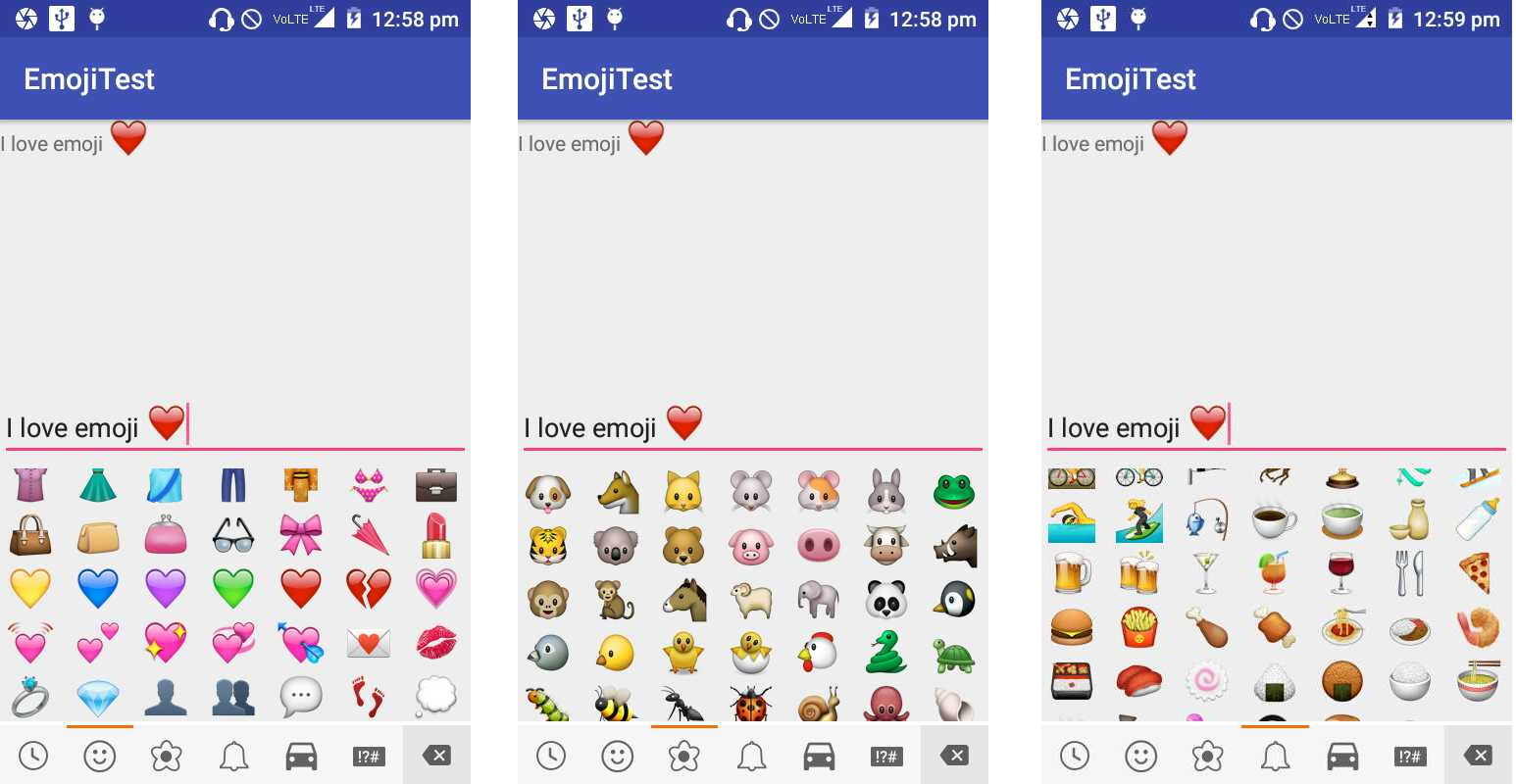
Rockerheiui Emoji Library For Android (Slight Modifications)


Usage:

>> EmojiconTextView: a TextView which can render emojis.
>> EmojiconEditText: a EditText which can render emojis.
>> EmojiconMultiAutoCompleteTextView: a MultiAutoCompleteTextView which can render emojis.
>> EmojiconGridFragment: a fragment contains emojis in a GridView for the user to choose.
>> EmojiconsFragment: a fragment contains many set of emojis for the user to choose.


Gradle Build:
implementation 'com.dbh4ck:nimbuzzrockerheiuiemojibydb:1.0'

Maven:


NOTE:

Your Target Activity must " implements EmojiconsFragment.OnEmojiconBackspaceClickedListener, EmojiconGridFragment.OnEmojiconClickedListener " as shown in code Below:


Github Source: Full source code available at my Github here

Bintray Repo: Click Here for Bintray Repo

Sunday, 30 April 2017

A Simple Android Library For Multiple Themes Support in Android Apps


Packaging:  AAR
Name:  apk-app-theme
Developer:  dbh4ck
Description:  APK Theme Changer Library
Url:  https://github.com/dbh4ck/db-apk-theme-changer
License:  The Apache Software License, Version 2.0
Version: 1.0
Support: Android API 14 or above
Download: available offline(.aar file) Download Here & can be compiled Online with Gradle (2.3 or higher) via jcenter repo.
Year: 2017
Details: A Simple Android AAR Library for the Support of Multi-Theming in Android Applications enhanching users to customize their apps as per the requirements of UI Designing. This Library contains a Dialog Fragment which popup from the bottom screen of the app & let you choose which color theme you want to apply to your apk. Total available themes are 20 by default which can further be modified and used as per the requirements.

How to IMPORT this Library in your android project?

METHOD 1:  Download Library as AAR And Import it in your project as per following steps in order.

In order to import a .aar library:

Step 1: Open Android Studio, Go to File > New > New Module. Select "Import .JAR/.AAR Package" and click next.
Step 2: Enter the path to .aar file and click finish.
Step 3: Go to File > Project Structure (Ctrl+Shift+Alt+S). Under "Modules," in left menu, select "app"
Step 4: Go to "Dependencies" tab. Click the green "+" in the upper right corner.
Step 5: Select "Module Dependency" Select the new module from the list and click ok. Youre done importing this library succesfully in your project.


METHOD 2: This Method involve online downloading & compiling library by Gradle using your project's default (jcenter) repositories

Step 1: Go to app-level build.gradle file and add following dependency:

// app-level build.gradle


dependencies {
    compile fileTree(include: ['*.jar'], dir: 'libs')
    androidTestCompile('com.android.support.test.espresso:espresso-core:2.2.2', {
        exclude group: 'com.android.support', module: 'support-annotations'
    })
    compile 'com.android.support:appcompat-v7:25.2.0'
    compile 'com.android.support.constraint:constraint-layout:1.0.0-alpha7'
    compile 'com.android.support:design:25.2.0'
    testCompile 'junit:junit:4.12'


   compile 'com.dbh4ck:dbtheme:1.0'   // This is our APK Theme Changer Library

}


Step 2: Hit "Sync Now" and you're done compiling this Library from my maven repo.


How to USE this Library:

After importing, now you can use this Library in your Activities as follow:

Step 1:

dbThemeDialog dialog = dbThemeDialog.newInstance();    // Create the new Instance of Dialog in an onCreate Method of your Activity

dialog.show(getSupportFragmentManager(), "dialog");     // Show the DialogFragment

Step 2:

Extend your "AppCompatActivity" to BaseActivity of this Library. (Dont Forget to make onCreate method as Public if you got error while building your project)


Open Android Studio >> Create New Project >> Create New Class named BaseActivity and extends it as AppCompatActivity as shown below. Paste following Code :


Create another class Utility to get the last saved Theme value Paste the code shown under:


Create a DialogFragment which will display list of colors for users to select and apply the selected color theme to the app

Tuesday, 27 December 2016

Avatar Grabber Palringo, Nimbuzz & Facebook using Picasso Library for Android


################ Avatar Grabber FB Nimbuzz Palringo ################

- Download Profile Images into ImageView 
- Picasso Image Library for Loading Images 
- Pass the Target URL to default Download Manager
- Save/Write Images to External Device Storage (specified path)


Download APK


Download source from Github
Following are the classes used for downloading Avatars via Default Android's Download Manager:


MainActivity Layout:

Identical Layouts for each Fragment:

Saturday, 3 December 2016

Xamarin Android (C#) Sample Xmpp Nimbuzz using Socket Connection (TcpClient)


################ Basic Requirements: ################

-  Xamarin Studio 6.1.6 (Latest)
-  SDK Tools Version: 25.2.3
-  SDK Platform Tools Version: 25.0.1
-  SDK Build Tools Version: 23.0.1
-  Android NDK
-  SDK Platform:
4.0.3 (API level 15)
4.2   (API level 17)
4.4   (API level 19)
6.0   (API level 23)
7.0   (API level 24)
-  Microsoft .NET 4.0.30319.42000
-  Xamarin.Android Version: 7.0.1.6
-  GTK# 2.12.38

################ Key Features: ################

- Xamarin Xmpp Client Sample (C#) For Android
- Socket Connection

################ Feedback: ################

- For any kind of further queries or bugs, kindly do not hesistate to write me at: dbh4ck@gmail.com
- http://dbh4ck.blogspot.in


Download Full Source Code From My Github

Download Apk


Tuesday, 1 November 2016

Nimbuzz MUC Banbot For Android with Navigation Drawer, Swipeable Tabs, Fragments Coded in JAVA using Android Material Design


################ Nimbuzz MUC BanBot For Android By DB~@NC ################


################ What's NEW: ################

- Coded Using Full Android Material Design
- Swipeable Tabs
- Navigation Drawer (Full Width)
- Fragment Activities


################ Fixed Bugs: ################

- Fixed Network Stability
- Support For Auto-Reconnection Added


################ Key Features: ################

- kick
- ban
- member
- greetings wc
- ipban
- add/remove master
- show master
- visitor/mute
- grant owner
- grant admin
- grant owner

################ Feedback: ################

- For any kind of further queries or bugs, kindly do not hesistate to write me at: dbh4ck@gmail.com
- http://dbh4ck.blogspot.in

Saturday, 2 April 2016

Monday, 14 March 2016

Android SQLite DB Sample - INSERT, UPDATE, DELETE


Features:   -  Create SQLite DataBase, Tables, Columns
                 -  INSERT  Data
                 -  UPDATE Data
                 -  DELETE Data
                 -  Drop Table IF ALREADY  EXIST

Download

Source on GitHub


Step 1 : Create A class for get-set Contacts:


Step 2 : SQL Database Handler class:

Step 3 : For adding new Contacts and Updating existing contacts here's the class:

Step 4 : MainActivity:

Wednesday, 2 March 2016

Nimbuzz Android MUC Bot Coded in Java using PURE JAVA SMACK 4.1.4 API


All Available Features in MUC Bot:

- mem user
- kick user
- ban user (ipban user)
- grant mod., admin, owner
- add bot commander
- remove bot commander
- users greeting., etc

Requirements:

- Android 4.0.4 (Ice Cream Sandwich) or Above

Download

Download Full Source Code Available on my Github
STEP 1 : Add following dependencies in app-level build.gradle

dependencies {
compile fileTree(include: ['*.jar'], dir: 'libs')
compile 'org.igniterealtime.smack:smack-android:4.1.4'
compile 'org.igniterealtime.smack:smack-tcp:4.1.4'
compile 'org.igniterealtime.smack:smack-extensions:4.1.4'
compile 'de.greenrobot:eventbus:2.4.0'
compile 'com.android.support:recyclerview-v7:23.1.1'
}

STEP 2 : Create a singleton class for making AbstractXMPPConnection universal throughout app

STEP 3 : Create a New Service class for creating xmpp connection to the server and connection Listener to handle connection state & other xmpp basic capabilities on Service Create and run this service in Foregroung as well:

Tuesday, 9 February 2016

Nimbuzz Android App with TabView XMPP Client Demo Using SMACK API (Pure JAVA Lib.)


Requirements:   -- Android Studio 1.5 or Later
               -- smack-core-4.1.4.jar
            -- smack-im-4.1.4.jar
                          -- smack-extensions-4.1.4.jar  
              -- smack-tcp-4.1.4.jar